Receiving the Deposit
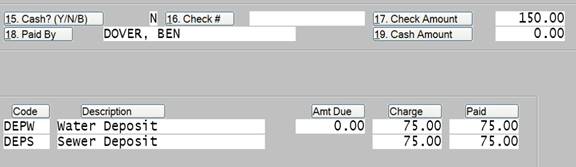
During Cash Receipts you would record the payment of any deposits using the Other Payments function as seen below.
After Updating Cash you would find that a Deposit Record has been created for the customer, which can be found under the “Finance” function in customer maintenance.

The Deposits screen in Customer Maintenance can be used to Refund these Deposits and a check would then be created by the Finance Department.
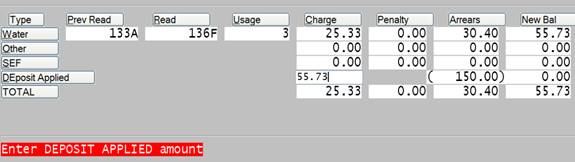
In the event that the deposit would be applied against a customer’s final bill then this can be accomplished during Meter Reading Entry using the DE-Deposit function.
If the amount of the final bill is greater than the total amount on deposit in the customer’s account then enter the amount of the deposit.
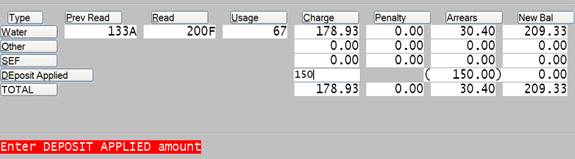
If the amount of the final bill is less than the total amount on deposit in the customer’s account then enter the amount due on the bill and the customer will end up with a zero amount due on their bill. The remainder of the deposit should be refunded through the DE-Deposit screen in Customer Maintenance.