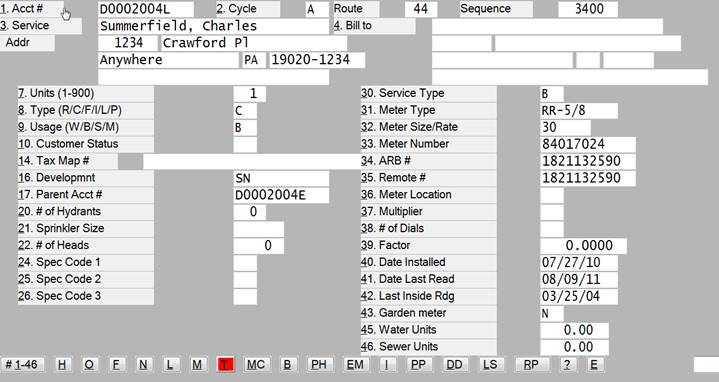
This program is used to maintain current customer information.
A customer can be found by account number, service name, service address or bill-to name. Once the account is selected, the account information will be displayed on the screen as seen above. Also the screens seen on the following pages will be options in this program.
The numbered lines correspond to the numbered fields on the customer maintenance screen. Because of the customization of your system, fields that you do not use will not display on your screen.
See “Customer Maintenance Field Descriptions” for further explanation on these fields.
ADDING A CUSTOMER:
If you wish to add a new account then enter the letter "A" and then 'CR' (carriage return). The program will ask you to enter the new account number and will verify that it is not already on file. The program will then take you through all of the fields asking for your input.
FINDING A CUSTOMER:
BY ACCOUNT NUMBER:
Enter the account # and that will bring up that account and all of that customers information. If you do not know the account number then enter 'CR' to perform other searches.
By CYCLE, ROUTE, SEQUENCE:
Entering a ‘CR’ at account number will proceed to the cycle field. The user can then enter the cycle number, followed by the route, and then sequence. Matches on the information entered will display, allowing the user to select the proper account. If an account is not chosen, the program will return to the account number field. If a cycle is not entered, the program will allow a search based on the service address.
BY SERVICE NAME:
If 'CR' is entered at cycle number then you may enter the service name. Any matches on that name will be displayed and the proper customer chosen. If you do not know the name then enter 'CR' to perform other searches.
BY SERVICE ADDRESS:
If 'CR' is entered at name then you may enter the customer's service address. Enter the street number and name or just the street name to search. Any matches on that address will display and the proper customer may be chosen.
BY BILL TO NAME:
If 'CR' is entered at service address then you may enter the bill to name. Any matches on that name will display and the proper customer may be chosen.
BY REGISTER #:
If 'CR' is entered at previous prompts, you may enter the register #. Matches on that register will display and the proper customer may be chosen.
BY BLOCK/LOT #:
If 'CR' is entered at previous prompts, you may enter the block/lot #. Any matches on that information will display and the proper customer may be chosen.