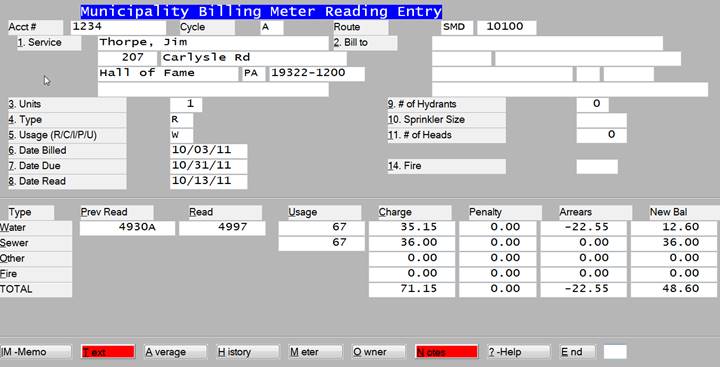
An account may be found by entry of an account number, service name, bill to name, service address or cycle and route. If your system is set for accounts to come up in route sequence then entry of a 'CR’ at account number will display the next account on that route.
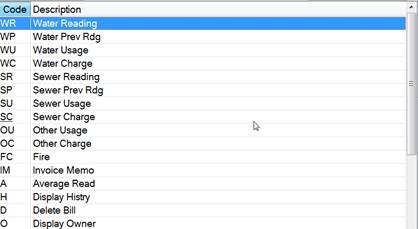
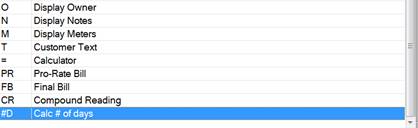
? HELP can be seen on the screen. This explains how fields or functions can be selected within the program. It would display:
The question Reading/Average/History/None? will be prompted. It will default to R.
|
Key |
Description |
|
R |
Enter all meter readings and calculate usage’s and charges. |
|
|
Enter date read. 'CR' at the date read will default to the last date entered in this program. |
|
|
If the account has a garden meter then the garden meter reading will be asked. Usages will be calculated and displayed. Garden usage, if any, will be subtracted from the usage used to arrive at the sewer charges. |
|
C |
Calculate the charges for all of the account's services. These might be water and sewer and other and refuse services. |
|
|
The current reading may be entered with a suffix of your choosing. Some common ones are: |
|
E |
Estimated reading. |
|
M |
Manual Reading or Meter Card |
|
F |
Final Reading. A final reading will cause the system to set the final reading date in the customer bill to file. |
|
I |
Inside Reading. Will cause the system to update the last inside reading in the customer file. |
|
A |
Average the last periods on file and use this average to calculate water charges and sewer charges. A meter reading suffix of 'A' will be supplied by the system. |
|
H |
This option will display the customer's history on the screen at this time and then return to allow another entry for this account. |
|
N |
No reading entry. Go to the bottom. |
|
|
At the bottom allow any of the above lines to be changed and an 'E' will update this transaction and return to ask for another account #. |
|
O |
Display the owner name and address. |
|
IM |
Invoice memo - enter a memo that will print on this one customer’s bill. At this time and then return to allow another. This memo will print on the bill and be inserted into the customer history. |
|
N |
Display the notes for this account. |
|
T |
Display the customer open text and allow modifications and additions to it. |
|
D |
Delete the bill that is currently on the screen. |
|
= |
Bring up the calculator. |