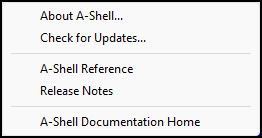
The contents of the Help menu are sometimes modified by the application, and by the doc\ashelp.mdf configuration file. So it is quite possible that your menu will look different than the one shown here. If the menu has not been modified, it will look like this:
Menu Item |
Description |
|---|---|
About A-Shell |
The About box displays information about A-Shell in general (copyright), this running copy (version, memory usage, font, etc.), and this particular license (nodes, serial number, etc.). |
Check for Updates |
This option checks to see if there are any A-Shell updates available. It will display the latest version along with your current version and give you choices to view the release notes and/or perform the update. Note that if you are running ATE, the update referred to will be for your instance of ATE only; it will not affect other ATE instances or the instance of A-Shell running on the server. Otherwise, it will be for A-Shell/Windows, which, depending on your network configuration, may be just for your workstation or a copy shared by other users. In the latter case, you will need to get the other users off the system before performing the update. |
Doc Links |
Among the document links, you will usually have a link to this document (A-Shell Reference), plus a link to the documentation page on the MicroSabio website. You may also have links to additional local documentation resources for both A-Shell and your application. See Help Menu Links in the Configuration section of this document for notes on customizing these items. |
