One common scenario is the typical web form, where the user fills in some fields and then clicks a button to 'submit' it to the server. For example:
<HTML>
<HEAD>
<TITLE> Sample Form Using A-Shell as a CGI Engine </TITLE>
</HEAD>
<BODY>
<CENTER>
<H1> Sample HTML Form Using A-Shell as a CGI Engine </H1>
</CENTER>
<P>
<H2> Welcome to our sample form </H2>
This is an example of a typical form that asks some questions, then passes them to a CGI program for some kind of processing, and then displays a new page with the results.
<p>
<FORM ACTION="/cgi-bin/cgitst" METHOD="POST">
<PRE>
Enter your name:<INPUT TYPE="text" NAME="name" SIZE=40>
zip:<INPUT TYPE="text" NAME="zip" SIZE=6>
<HR>
What is your age?
<INPUT TYPE="radio" NAME="age" VALUE="1-10">1-10
<INPUT TYPE="radio" NAME="age" VALUE="11-30">11-30
<INPUT TYPE="radio" NAME="age" VALUE="31-60">31-60
<INPUT TYPE="radio" NAME="age" VALUE="61-112">61=112
<P>
<TEXTAREA NAME="comments" ROWS=5 COLS=60>
This comment will appear in the comment box, but you can erase it or add to it.
</TEXTAREA>
</PRE>
<HR>
<INPUT TYPE="submit" VALUE="SEND FORM"><BR>
<INPUT TYPE="reset" VALUE="Clear form">
</FORM>
</BODY>
The above HTML displays a simple form that looks like this:
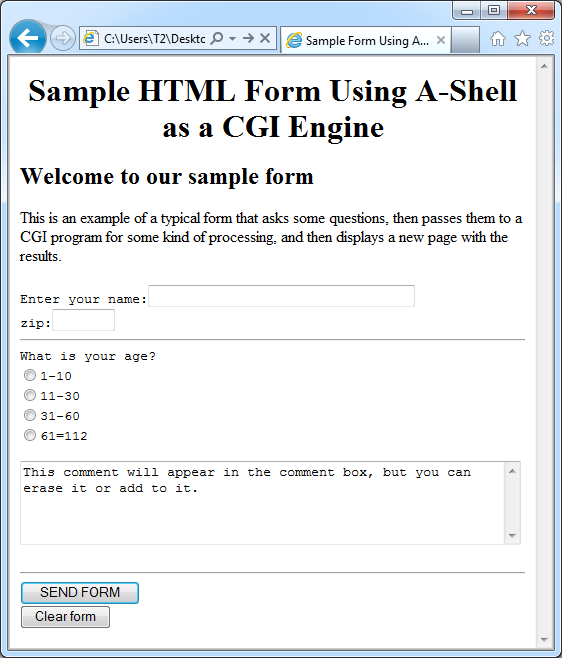
The most important line in the HTML for the purposes of this example is the one starting with "<FORM ACTION". The form of this, and the contents of the referenced script will be slightly different between Unix and Windows, so they are discussed separately in the following topics.
