Throughout the pawn software there will be report called "Display / Prints" abbreviated "D/P". They are more generalized than a specific report, yet not as demanding as a completely generalized report writer. They provide a capability of very quickly searching a data file for a particular subset of data. There will typically be a D/P routine for each file having a maintenance program. Options select the format, the sequence order, where the report is sent (see printer definitions), and typically multiple specific selections based upon the data fields.
Reports can be created by selecting on ranges of low and high dates, employee numbers, transaction status (such as of a loan, renewed, paid, dropped, etc.), firearm number, inventory category, stock number, low and high loan number, transaction number, etc. The TAB key is used to designate that a particular data field is not used as a selection field, when the TAB key is pressed the screen will display "ANY" in a field.
The following sample screen shows how a display / print screen will appear. The first three fields will be the Format, Sequence, and Display or Print options. The Format field has a preset list of report formats. The Sequence field designates the order that the data will be printed. In the Inventory display print screen, the sequence field has two options, either in order by S=Stock number, or by C=Category number. The default sequence is displayed as an "S". The third field is the option to Display the result on the screen or to print the report on the printer. Normally all the display / print routines will default to D=Display. If the display option is selected the listed data will fill a screen and the routine will wait for the Enter key to be pushed. This will notify the routine to clear the screen and display the next group of data. The display will have an X to Exit option, by entering an "X" the operator is taken back to the selection screen where other selections can be made.
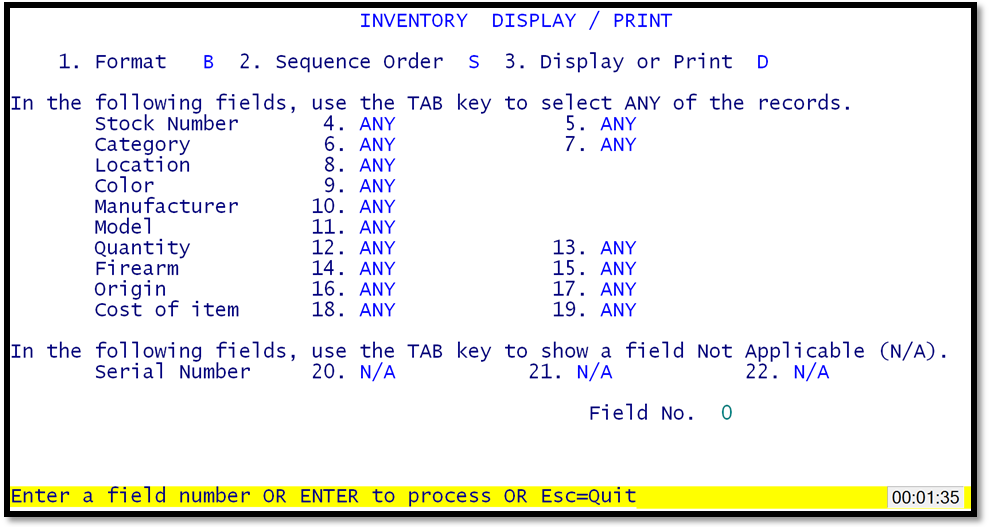
Sample Display / Print Screen
