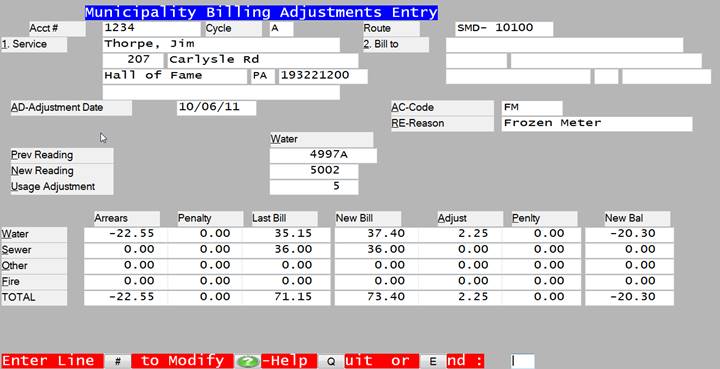
The adjustment entry program allows the user to make adjustments to any account. The program displays existing account and billing information and then allows you to create the proper adjustment.
After bringing up the account information using account number, service name, etc., the program will ask you for the date and reason for the adjustment. After this information has been entered, the program will ask you to enter the mew reading on which to base the adjustment. This may or may not be the same as the current reading on the last bill sent. This might be as follows:
Prev Reading 35000 New Reading 45000
After the reading is entered, the program will prompt:
WOULD YOU LIKE THE ADJUSTMENT CALCULATED FOR YOU? Y/N: X
If you answer Y to this question then the program will automatically calculate an adjustment based on reversing the charges generated by the previous reading and then adding the charges generated by the current reading (new reading).
If you answer N to the above prompt, the program will then prompt:
WOULD YOU LIKE TO ENTER THE ADJUSTMENT AMOUNTS? Y/N: X
If you answer Y to this question then the program will ask you to enter the amount of each adjustment directly.
ENTER THE AMOUNT OF THE CORRECTED BILL? Y/N: X
If you answered N to each of the prior questions then the system will ask you to enter the amounts of the corrected bill. Then as you enter the charges that you would want the new bill to reflect, the program will calculate the adjustment amount by subtracting the amount of the last bill and adding the amount of the corrected bill.