The store management daily routines handle the cash drawer(s), print daily summaries, totals individual sales, allow miscellaneous cash transactions and print various daily reports.
Store Opening Procedures
The following routines should be done daily in order to prepare the system for operation:
1)Look over the nightly integrity printout. There should be a, loan, inventory and firearm integrity listings. If there are errors reported on any of the listings then they must be resolved.
2)Check the amount of paper available for each printer; make sure the 'SEL' and 'POWER' light is on for both printers.
3)Check the date and time displayed on the master menu screen. To refresh the date and time, select a menu and then ESC out of it back to the main menu.
4)Open the cash drawer(s), in the daily store routines.
5)Always check the first loan printed and continue throughout the day to verify that the loan number printed matches the pre-printed number on the ticket. Use the E-J Show Last Transaction Numbers selection to verify the last loan on the system.
Store Closing Procedures
The following procedures should be done at night when closing the store.
1)On all inactive workstations use the ESC key to exit all routines and bring up the Master menu on all workstations. Then use the “G” selection to close the APS window.
2)Close the cash drawer(s), in the Store Management.
3)Run the summary of drawers, in the Store Management.
4)In the Store Utilities menu select Count Max/Used and look at the current totals and percents used for each file. By checking the counts everyday the operator can predict when a particular file will be getting full.
Plan to expand, purge or consolidate in the case of the Audit file no. 9, before that time. An expand or contract of a file should be run after closing the store because the file will not be available during the running of the expansion routine.
5)Run any other reports that the store requires.
6)Start the integrity routines in the Utilities menu.
End of Month Procedures
Be sure to have any daily sales summary or store transaction reports printed first. The consolidation of the data is summarized into total amounts by employee by transaction type. Run the consolidate daily to monthly routine according to scheduled consolidation. It is recommended to have six to seven months of data in the audit file. An example for consolidating would be: using today's date at May 31, 2003, consolidate through October 31, 2002.
In the first few days of the new month, use the Loans Display / Print to print the loans made in the previous month in alphabetical order and brief format then put the listing in a binder. This provides the ability to look up a pledgor by last name in case they lose their ticket and there is a power outage.
If the printer to be used for this report has 8 1/2 x 11 inch paper, then before selecting the loan display / print routine select printer assignments in the store parameters and verify that the printable page length is 66 lines instead the normal 33.
In the Loans Display / Print routine, change the sequence order to A=Alphabetical, change the display / print to P for print, select either a low / high range of loan numbers, OR change the date made low / high range to the first day of last month and the last day of last month.
Match all the loan and purchase pull listings with the associated update to inventory listings. Use the example inventory reconciliation sheet in the paragraph "Receipts update to Inventory", in chapter 3. This will handle any items that are expensed as: bulk increases, broken, stolen, or police confiscations.
An alphabetical listing of all layaways made in the previous month should also be printed. This listing is used when the comes in to make a payment on their layaway and the system is down or there is a power outage. From the master menu select B Display / Prints then D Sales Display / Print. Change field 2, to A for alphabetical, fields 10 and 11 to the first and last date in the previous month, and field 3 to P for print.
End of Year Reports
Inventory totals. The value of inventory as of the end of year is needed for tax returns. Most stores have an end of year date that is December 31. On the 31st or in the next few days use the Total format in the Inventory Display / Print. In the Daily Business menu select E. Inventory Display / Print. Change field 1 the format option to a “T”, and field 3 to a “P”. This will print total values that are needed for tax returns.
Totals “As Of” report. The “AS OF” report in store management will also be needed for end of year totals. It does not have to be run at the end of year or month in that the “AS OF” date is entered when the report is run. From the master menu enter D – G – J to start the as of report.
For a total of the store loans and layaways at the end of 2019, enter 123119 in the AS OF date field.
Store Management
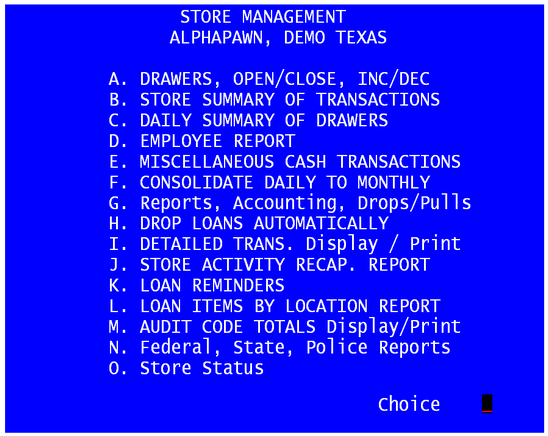
DRAWERS, OPEN/CLOSE, INC/DEC
The cash drawer routine opens, increases, decreases, and closes the cash drawers. The program will prompt for a drawer and a letter to signify the operation being performed. On the right side of the screen is a status display for all the drawers, showing whether they are open or closed. If the drawer is being closed, a closing date may be entered. This allows one to close yesterday's drawer before opening today. The QUANTITIES of each denomination are counted and then entered. The program will then multiply each quantity to compute the amount in dollars. As in other routines the operator will have a chance to change any of the entries. When all changes are complete the operator must enter their PIN number, saying "Yes, I agree with the amount". A transaction slip will be printed. At the beginning of each day the person who opens the store and disperses cash to the cash drawers must start with this routine. This routine requests the amount of money for each drawer. Each employee is assigned to a drawer (see Store Management Routines). Enter a drawer number and the letter "O", (open) to denote open and then enter the quantities of each cash amount. Typically during the day, the store manager may add cash to the drawer or take all checks and charge sales from the drawers for a bank deposit. This routine tracks the increase or decrease in the drawer cash. The routine will ask for the drawer number and the amount of the increase or decrease. At the end of the day, the routine counts each cash drawer. The amounts are written into the system audit file to use as a check against the day's transactions. The drawer may be closed as of a previous day.
Note, if a transfer is used to move dollars from one drawer to another drawer, there will be two transaction slips printed. Each are compiled with the open, close and other transactions for that drawer.
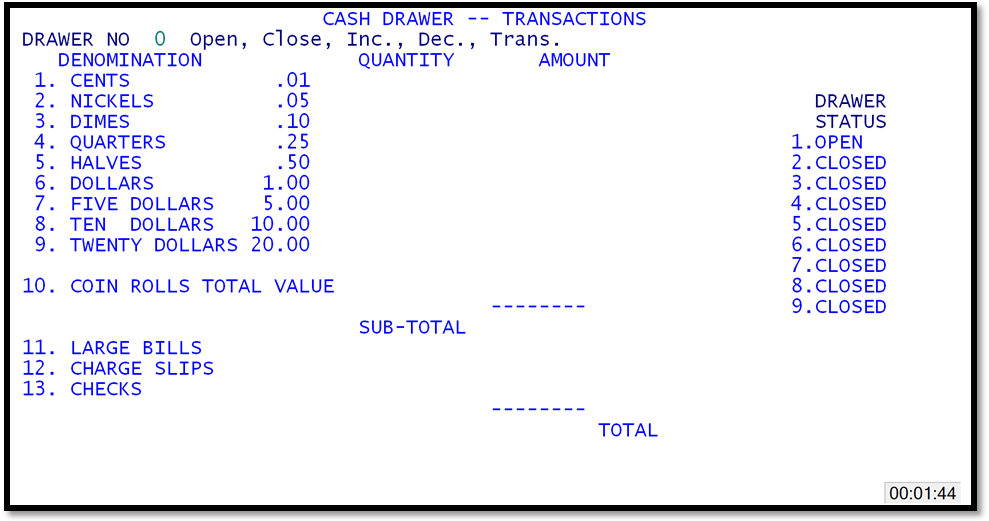
Cash Drawer Transactions
