The Inventory routines keep account of serial numbered items, multiple items, and bulk items. The following items are examples of serial numbered items: drills, TVs, and stereo units. Multiple or quantity items usually are specific items with a fixed price: record albums, gun cases, and CD's. Bulk items are those items with no price tags and are usually stored in a bin: sockets, screwdrivers, or saw blades. When a bulk item is sold, a sale price is negotiated and entered immediately when the sale is made on the computer terminal.
Accounting for cost of goods with bulk items can be handled two ways: 1) is to take the cost when the item is put in the bin as an immediate expense, then any bulk sales are profit only with no cost, 2) put the items in bulk inventory and take a percentage of the sale when the sale is made. See E-A-A field 9, the cost assigned to bulk items. Further on in this chapter, is "Update Receipts to Inventory", it details the reconciliation of inventory for a time period.
Each item(s) is assigned a stock number. The stock numbers from 1 through 899 are reserved for bulk items, each bulk item STOCK NUMBER should be the same number as the CATEGORY CODE. For example, if sockets are CATEGORY 643 then the Inventory Stock Number should be 643. Inventory increases/decreases are accomplished with the following methods:
1.Purchases from customers
2."Pulls" from any loans that drop
3.Receipt of goods ordered from wholesalers
4.Sales of items,
5.Layaway payments in full.
Adjustments to inventory may be completed by using the Inventory Maintenance routine. The operator is allowed direct access to inventory totals, this allows changes to the total items for a stock number due to inventory losses caused by for example broken items or missing from the store sales floor.
In each of the following transactions is a discussion of bulk vs. individual items and how the quantities and dollar amounts are affected. The purchases from customers program will prompt the operator for information about the item(s) being bought. If the item is a firearm then name, address, and firearm information will be required and added to the firearm register. When the purchase is complete a purchase receipt will be printed. At that time the item can be entered either into the master inventory file or the inventory receipts file. If it is going to be inserted directly into inventory, a stock number will be assigned by the computer and displayed to the operator to write on the item. If the item is a bulk item the operator may enter a stock number between 1 and 899 and that number must equal the category number. A price tag will not be printed if it is inserted immediately. The firearms file record is automatically created each time a category code in the 900's is used with loans and purchases. The firearm is inserted into inventory receipts when:
1.A loan is dropped
2.A firearm is purchased and the 'L' later option is taken at the end of the purchase transaction
3.A vendor sells the store a quantity of guns and the shipment is received.
When the store receives firearms from a vendor, there are two ways to add the firearm to the firearm file. The first method of getting a firearm into the firearm file and also into inventory receipts is to purchase the item(s). This will automatically create firearm numbers for each item and the firearm information only has to be entered once. At the end of the purchase transaction use the 'N'=Now option. The second method is to select the firearms maintenance routine and add the gun and acquisition information in the firearm file manually. Then enter the receipts inventory routine and reenter the same gun using the firearm number assigned in the firearm maintenance routine. Either method will accomplish the task of entering firearms in inventory.
A concern regarding the first routine is that if the items are purchased for specific amounts, those amounts will affect the daily cash drawer. The cash drawer routine will assume the cash was paid out. If an invoice from a distributor will be paid at a later time then the "cash" was not paid out of the drawer. To overcome this problem, there are two methods that may be used: 1) the cost of each gun at the time the purchase is made can be entered as 0.00. The actual cost can be entered when editing before update in the receipts of inventory file, 2) Add a second employee number for the store manager to be used only for firearm wholesale purchases and assign that “2nd” employee number to a drawer number that is not used.
When orders for items that are not firearms are received, they can be entered directly into inventory receipts. All information required for a new inventory item is entered in item receipts. If the item received is an addition to an existing item in inventory then some of the fields are not required. Before any item is posted to the master file a stock number will be assigned if not entered. The average cost field in the inventory master file will be automatically adjusted when a new item(s) is added to an existing stock number. The fields in the receipts file are the same as the fields in the inventory file. In addition there is a temporary line number assigned to each entry so that the operator can easily access and change records in the file. This field is not part of the master inventory file.
If the number already exists in the master inventory file, any fields that are entered in receipts file will replace the fields in the master file, i.e. change the price, color, model, the new quantity will be added to the old quantity. If the labels have not been erased from a previous update to inventory, then the new labels from receipts will be added to the end of the list of labels. There will be a label created for as many items as in the quantity field. If for example a case of 24 domino sets were received, and therefore the quantity field will be set to 24, there would be 24 stock labels printed.
Categories are important to inventory in that it gives the ability to look up quickly any item to see if it is in stock. A category in the 900's is important in that it tells the system that the item is a firearm and special procedures are used. When an extra item line is used to more fully describe the items (even though there is only one item), use the same category number. When item reports are run and a low / high range of items is requested the continued lines with additional description will also be selected and displayed. If the item is a firearm and an additional line is needed to more fully describe the item, use the category code 899, then the system will not assume the second line is a firearm and assign it a fed book number. Inventory print/display is important in being able to help find a specific item or a lost stock number. It is one routine of the system that can be very helpful as a selling tool. This is the reason that inventory display/print is in the daily business menu. Inventory display/print works in the same way as all other display/prints with its use of parameters to narrow down the type of item required. By using the category code the routine will display items immediately. This enables an employee the ability to answer on the phone a question for a particular type of item.
Note, a unique feature of APS is the ability to have specific categories and a bulk stock number be a comment that is to be printed on a sale or loan ticket without any sale or loan amount. For example the description for category and bulk number 014 is "old and scratched", or "no remote tuner". Then when making a loan enter category 014 and the "old and scratched" is included on the pawn ticket. Note on layaway sales, there is a case where the amount to be paid and frequency can automatically be printed on layaway reminders.
Inventory Fields Modified During Sales
Depending upon the type of inventory item, either serial numbered or bulk, some of the inventory record fields will be updated when a sale is made. When a serial numbered or quantity item is sold then the following fields will be changed:
The Number of Sales will be increased by the quantity sold.
The Quantity of Items will be decreased by the quantity sold.
When a bulk item is sold, then the following fields will be changed:
The Number of Sales will be increased by 1.
The Sales Price Field will be increased by the amount of the sale.
If the sale is a layaway, the inventory fields are updated when the layaway is paid in full.
Cost of Goods Calculation
The cost of goods calculation depends on the type of inventory item. If the item is a serial numbered or quantity item, the cost is calculated from the average cost field. The cost of a bulk item(s) is estimated to be a percentage of the retail sale amount. In the store parameters, the field "COST PERCENTAGE" defines the actual percentage. The cost of an item may be modified during a sale, see field 12, switches, in the store parameters maintenance. Further on in this chapter, is "Update Receipts to Inventory", it details the reconciliation of inventory for a time period.
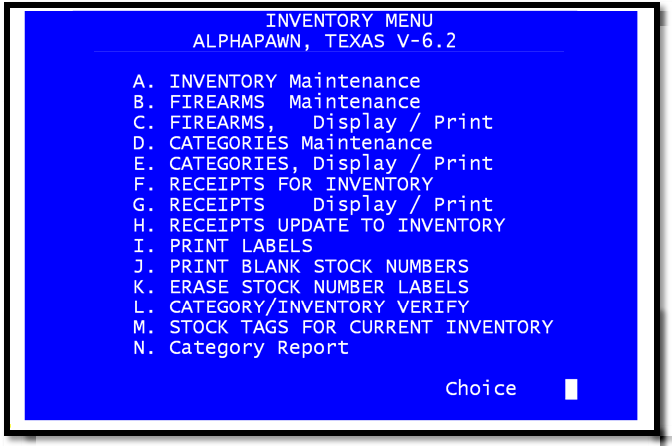
Inventory, Firearms, Categories
