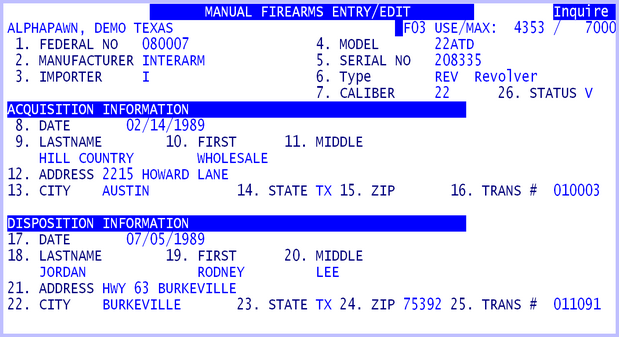
The firearms file is accessed and updated by the Loans, Sales, Purchases, and Inventory routines. The acquisition information is completed whenever a loan or purchase is made. The disposition information is completed whenever a loan is redeemed or a sale is made. In the firearm master file, transaction numbers are kept for both acquired and disposition. Using these numbers one can easily trace a gun.
It is important to remember that the Firearm routine is just an automatic firearms book and entries should not be deleted. If a firearm was entered by mistake, then the entry should be modified to show it as a void. If a gun is deleted, errors will occur in the running of some programs. If a firearm record is deleted by accident, then use the firearm maintenance routine to add that number back into the firearm file. Once a number is used it must stay in the file even when the transaction is voided.
The firearm number can be searched for in the Inventory display/print. If a firearm loses its price tag, but if the firearm number is known, a search for that firearm can be done to get the stock number. Firearm display/print searches on low and high firearm numbers. If a general area of numbers is known, a firearm can be found in that way. The firearms master file is the gathering place for all firearm transactions. It contains all information that would normally be kept in a manual system.
Each Firearm entry has the following information:
Firearm information
Firearm number
Manufacturer
Importer
Model number
Serial number
Gun Type defined by ATF 2016, see 4473 form. Valid entries:
Pistol, Revolver, Rifle, Shotgun, Receiver, Frame, Pistol Grip Firearm,
Any Other
Caliber
Status code maintained automatically by the APS software, see list below
Acquired
Date
Name, address
Transaction number
Disposition
Date
Name, address
Transaction number
Using the firearm maintenance routine all the edit modes are available. A record may be added, inquired, changed, or deleted. When making a sale of a gun, the firearm record is accessed and updated automatically. To properly fill out the firearm record the complete name and address will need to be entered in the sales routine. The correct stock number is essential to keep the gun book accurate. If a mistake is made in the name or address fields the record can be changed in Firearm maintenance. Layaways are no different than sales except for the fact that the disposition is not completed until the final payment is made. The loan routine will automatically create a firearm entry for any line item with a category in the 900's. When additional information is needed for a gun the next line may be used but the category should not be a 900. If it is, another entry for that gun will be added to the master file. If for example the gun came with a holster, use the category 899 for firearm accessories. If a mistake was made and a category 900 was given to a non-firearm, the system will assume the item is a gun, assign it a firearm number and entry and when the loan is redeemed the disposition will be completed. It just means there is additional information in the firearm fedbook.
Redemption of a loan fills out the disposition fields in the firearm file. The loan routine will ask for changes to the name or address fields in case the name or address of the person redeeming the loan is different from the original person that made the loan. Renewals of loans do not change the firearm master file. The firearm number on the original loan is transferred to the new loan. Using the change mode is the same in firearms as in any maintenance routine. The field number is chosen when the system asks "CHANGE NO." and then the correct information is entered. If the disposition fields need to be blanked out, in the fields one blank character is needed then push Enter to erase the whole field. The date field is a special case. Since a date cannot be valid if all zero, the way to "clear out" an existing date is to use the Control-Z feature of the input editor. Use the change mode to put the cursor in the date field and then hold down the Control key and push "Z".
The status code maintained in the firearm record will identify where the firearm is in the store. The following status codes are defined:
| I | The firearm is in inventory for sale. |
| C | The firearm is being sold on layaway on Credit. |
| L | The firearm belongs to an active loan and is in pawned storage. |
| P | The firearm was returned to customer as a Paid loan. |
| S | The firearm has been sold, either by a sale or paid layaway. |
| V | The firearm record has been voided and is not used by a firearm, this may be either a voided loan or purchase, or a mistake in entering a loan or purchase. |
The following transactions set the firearm status code:
Subject |
Transaction |
Status |
|---|---|---|
Loans |
Write a loan |
L |
Pay a loan |
P |
|
Drop / pull a loan |
I |
|
Void a loan |
V |
|
Purchases |
Purchase from customer |
I |
Void a purchase |
V |
|
Sales |
Layaway a firearm |
C |
Drop a layaway |
I |
|
Void a sale or layaway |
I |
|
Pay a layaway in full |
S |
|
Sell a firearm |
S |
Use the Firearm Display / Print routine to create or display the reports.
