The store parameters screen 3 selection contains a list of types of identification that may accepted in the store. There are nine possible ID types. Usually the Credencial Elector, (Mexican Voter ID), is not accepted in the US and is available for stores that operate in Mexico. The example below is typically settings used in the US.
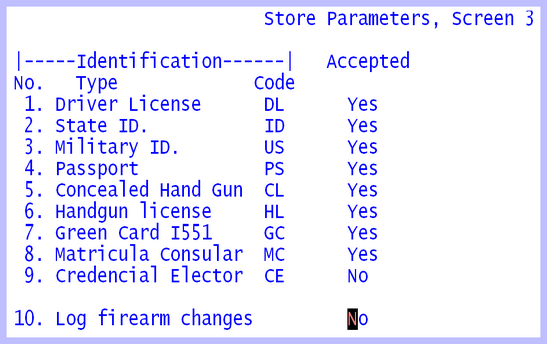
Select each field from 1 through 9 and enter either a Y=Yes, or N=No. When a program requests an Identification, the following mini help line will then be displayed, saying only eight responses are valid.
1=DL, 2=ID, 3=US, 4=PS, 5=CL, 6=HL, 7=GC, 8=MC
The Log Firearm changes option field 10, designates whether changes to the firearm file are to be entered in the Firearm changes file in order to print the ATF Firearm book. In 2016 ATF published a memo saying that the manual paperwork file is NOT necessary, if a method to transfer a copy of the firearm file can send the file to an external storage device such as a thumb drive or writable CD. In the folder APSDOCS is a copy of that ATF document.
When the ESCape key is pushed to exit this screen, there will be an option to print the screen. This printout can be cut and taped to the workstations to help learn the abbreviations displayed on the mini help line.
