Tkt Form
With the use of lasers for printing pawn tickets, a more flexible method for designating the pawn ticket form has been implemented. The traditional dot matrix form that is specific to each jurisdiction is designated with an entry of the number 1. If preprinted pawn tickets are to be printed on a laser/inkjet printer then enter either the number 2 or 3. The number 2 or 3 tells the system the form type in the printer, either a two or three ticket image.
Note: the file PWNS01.DAT must be downloaded during a new installation.
There are two adjustments that may be used to move the printed image so that the printed text is located within the pre-printed pawn ticket lines: 1) Moving the entire image, and 2) moving a printed field within an image.
Moving the entire image on a new laser or inkjet printer.
All lasers do NOT print in the exact same starting position. Therefore, a starting point image adjustment is used to compensate for an individual laser printer.
The starting origin offsets are typically the only one needed to be adjusted. These are the X and Y starting position of the printed image. These two fields are in the printer control file that is named with the ticket printer name from field E> A > A > 17 Ticket printer. For example the name is TKTLAS, then the control file will be called TKTLAS.PQI. The file may be accessed via either Windows or A-Shell.
A-Shell: The file is located in DSK0:[7,1]. To open the file for viewing and editing, exit APS to the A-Shell prompt and enter: VUE TKTLAS.PQI
Windows: The file is in the folder C:\VM\MIAME\DSK0\007001\. Use Notepad to open the file.
There will be two lines that define the X origin, and Y origin, the parameters are on the left and the semicolon is the start of comments:
The X origin says how far down the paper the first character is to print.
The Y origin says how far to the right the first character is to print
The two lines in the file will look something like this:
XORIGIN=450 ; Top margin in TWIPS 360= 1/4", 180=1/8”, 90=1/16”
YORIGIN=535 ; Left margin in TWIPS, 1440 = 1 inch
The X origin of 450 says print the first character 5/16” of an inch from the top; 450 = 360 + 90 = 1/4 + 1/16 = 4/16 +1/16 = 5/16
The Y origin value of 535 says print the first character to the right a little less than 3/8”. A value of 540 = 3/8” = 360 + 180 = 1/4 + 1/8 = 3/8, since 535 is less than 540.
These measurements can be done in decimal since one inch = 1440 TWIPS ( printing industry term), so 535/1440 = 0.3715 inches.
Moving a printed field within an image
Once the image of a pawn ticket is being printed in the correct locations, there may still be one or two fields that need to be adjusted. This in theory should never be needed because the ticket form doesn’t change. In order to change the location of one field there is a utility program: PWU975, that is used to adjust each field. From the APS. prompt enter:
RUN PWU975.
The screen will clear and display:

Enter the ticket Form number used in field 30. Either a 2 or 3. This will display fields 1 through 4.
1.Form Description.
2.Vertical adjustment for the second image. Use this once the first image prints correctly.
3.Vertical adjustment for the third image if a three image form is used.
4.Displays the individual field parameters. A section of it is displayed here:
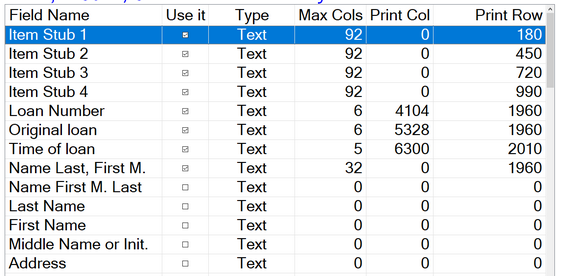
For each field there is a “Use it” option. That is because sometimes there are multiple ways to print a field. For example, the name field can be printed combined and individually. In the example above the name will print in the order last name, first name, middle initial. There is a maximum of 32 characters that may be printed, a long name will be cut at 32 characters. It will print in column 0 (far left of ticket, offset by XORIGIN ). It will print vertically down the ticket at 1960 TWIPS, or about 1 and 3/8 down the ticket. 1960/1440= 1.36 inches. Note that Loan Number, Original Loan, and Name all print on the same line.
